Squarespace has been a favorite of entrepreneurs and small businesses for years, but the recent price increases have many folks asking whether it's still the right choice. The answer really depends on what your site needs to do. Whether it’s a simple portfolio, a service business with booking, an online store, or a content-heavy archive.
This guide compares Squarespace, Wix, WordPress, Showit, and Shopify on pricing, customization, ease of use, and what it really costs to move an existing site.
Real Price Differences
The figures below are approximate monthly rates for annual-billing prices at the time of our research. Platforms change their pricing often, so always confirm current rates before you make your decision.
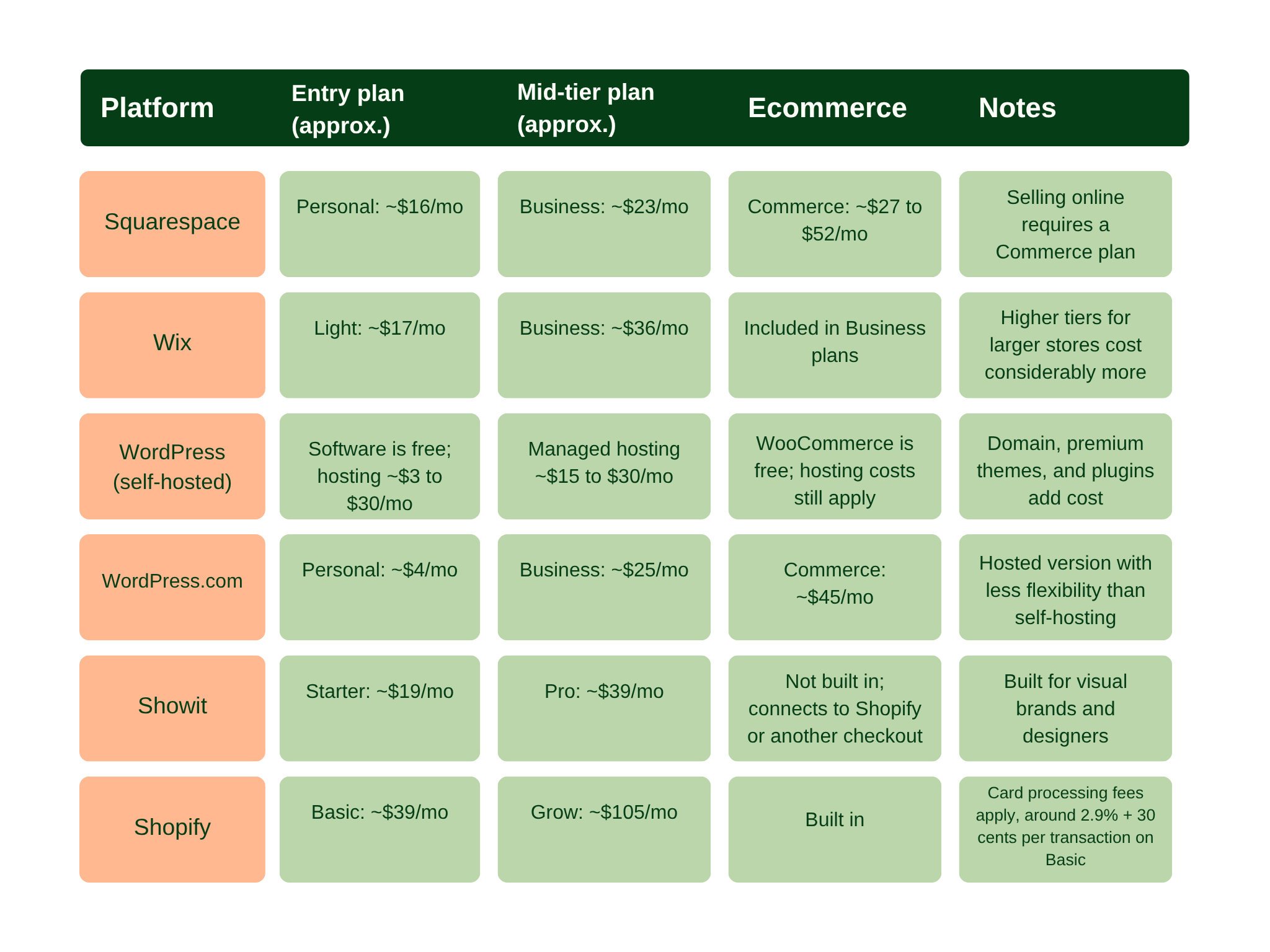
The monthly price is only part of the picture. Squarespace and Wix look inexpensive on paper, but they are usually the less desirable option if online selling is the main part of your business, because they push you into a higher tier. Shopify costs more each month but includes ecommerce tools that the others either charge extra for or handle through add-ons. WordPress can be the cheapest option over several years, but it requires a much higher upfront investment to be built by a web developer. And if you aren’t a developer yourself, you will most likely need to pay someone to maintain the site.
How Much Can You Customize?
Squarespace: Strong templates with a clean style editor, plus custom CSS and code injection on higher plans. Layouts stay within Squarespace's system, so the design is consistent but has real limits.
Wix: A freeform drag-and-drop canvas gives you precise placement of every element. Wix Velo lets developers add custom JavaScript, and the app market is large.
WordPress: The most customization available. Thousands of free and paid themes, plugins, and custom PHP or CSS let you build almost anything, and you control the hosting too.
Showit: A freeform canvas designed for brand-focused designers and photographers, with precise typography and layouts. Its blog and SEO features are more limited, which is why some users pair it with WordPress for content.
Shopify: Deep e-commerce customization through themes, apps, and Liquid code. Store templates are flexible, but a fully custom layout usually requires a developer.
User-Friendly vs. Needs Someone Technical
Easiest to run yourself: Squarespace and Wix. Drag-and-drop editing, built-in hosting, security, and updates are handled for you.
Moderate learning curve: Showit, because canvas-based design takes time to master, and Shopify, where setting up a store is simple but customizing themes gets technical.
Needs ongoing technical help: WordPress. Installation is easy with a host's one-click setup, but updates, plugin conflicts, security, backups, and speed optimization often require someone who understands code. Self-hosted WordPress is not a set-it-and-forget-it platform.
Thinking About Leaving Squarespace Because of the Price Hike?

If you're considering a move because of the price increase, remember that migration can cost far more than you save. A professional rebuild of a small business site often runs from $2,500 to $5,000 or more, and larger stores can cost much more. Even if you do it yourself, you pay in hours: recreating pages, rewriting or reformatting content, re-uploading images, rebuilding forms, and reconnecting email, booking, and analytics tools.
The hidden costs add up quickly. Changing your URLs means setting up redirects so your search rankings are not lost, and rankings can dip for months after a move. Domains may be locked for a period after transferring. Online stores need products, customer accounts, and payment settings moved over. Broken links and lost form submissions can cost you leads during the switch.
Here is a simple example. Suppose you pay $23 per month on Squarespace Business and move to hosting at $15 per month. You save $96 per year. A $2,000 migration would take more than 20 years to pay for itself, and that's before counting WordPress maintenance, which can erase the savings entirely. Before switching, compare your renewal price with the full cost of moving, including your time. For many owners, staying put is the smarter financial decision unless the site truly cannot do what the business needs.
Overall Pros and Cons
Squarespace
Pros: All-in-one hosting, very easy to use, reliable performance, built-in analytics
Cons: Rising prices, somewhat limited layout control, online selling requires higher-priced plans
Wix
Pros: Freeform design, low entry price, large app market, developer options with Velo
Cons: Sites are harder to export and move later, performance can slow with many apps, less user-friendly and more reliance on developers long term
WordPress
Pros: Maximum flexibility, huge plugin ecosystem, you own the site, often the lowest cost over time
Cons: High initial buildout investment, requires regular maintenance and technical know-how, you are responsible for security, plugin costs add up
Showit
Pros: Exceptional design freedom, polished templates, strong fit for brand-focused creatives
Cons: Smaller app ecosystem, limited built-in ecommerce and SEO, learning curve for canvas design
Shopify
Pros: Best-in-class e-commerce, scales well, huge app store, strong checkout experience
Cons: Higher monthly cost, transaction fees, deep design changes often require Liquid knowledge
We understand how painful it is to switch platforms. These companies know that too, and they count on the time and money you have already invested in your site to keep you from leaving. We share all of this so you can make the final call yourself. As busy business owners, we sometimes have to pick our battles.
If your Squarespace site works and the price increase is manageable, staying is often the most cost-effective choice. Consider moving when you need features Squarespace can't deliver, such as advanced e-commerce, deeper customization, or better control over SEO, or when the long-term savings clearly outweigh the full cost of migration.
Want to discuss what is the best platform for your business? We offer free consultations, reach out to book a discovery call!